Rebuild Power BI pbix from a PBIR Report and an XMLA-Modified Semantic Model
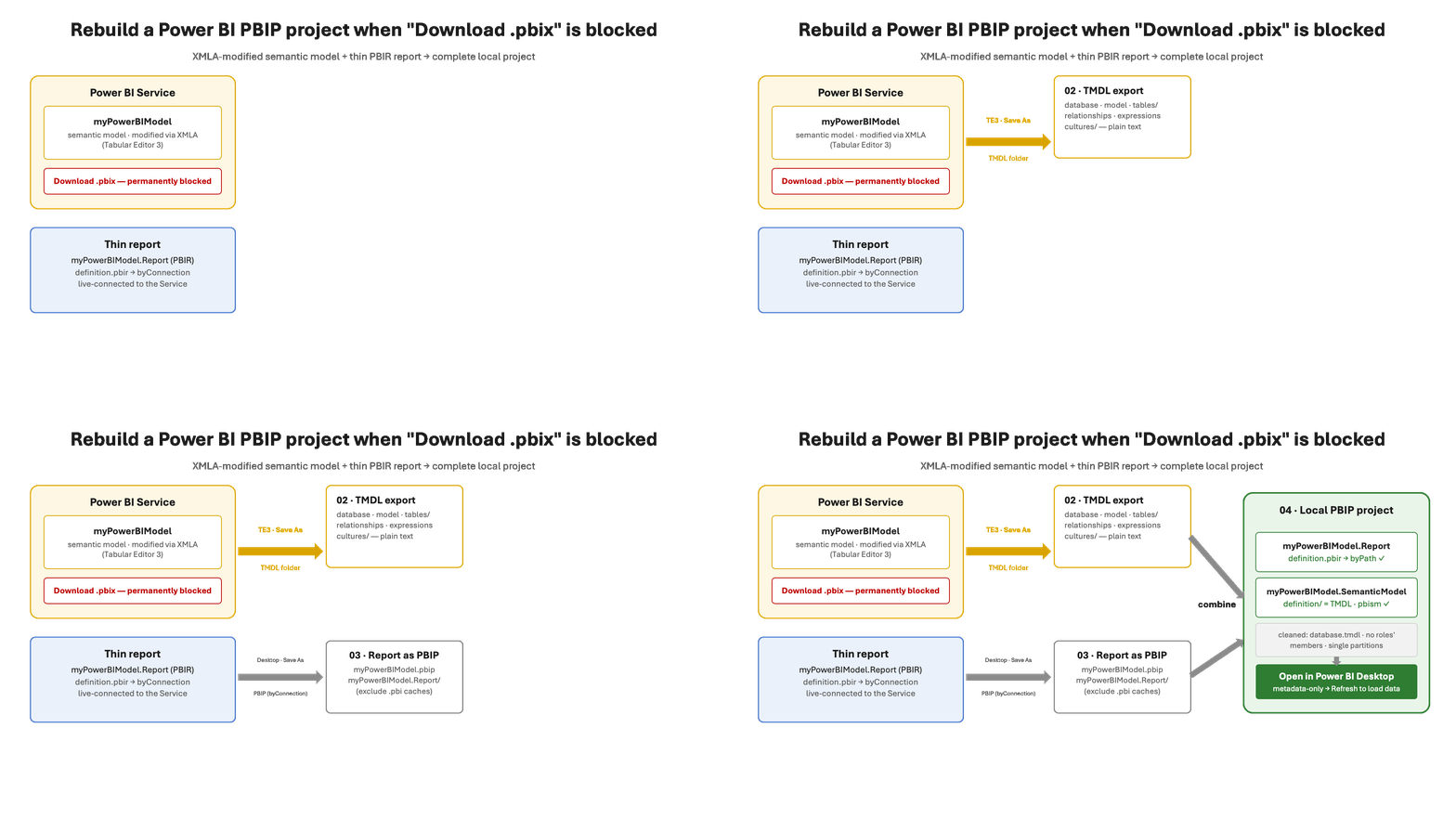
Scope
Your company’s Power BI solution has two parts: a data model (we call it myPowerBIModel — the engine holding your numbers and business rules) and the reports you look at every day.
This article explains how to rebuild Power BI pbix when the original .pbix file can no longer be downloaded from the Power BI cloud — why it happens, why nothing is lost, and how the whole solution is rebuilt. Each section ends with a short technical note your Power BI specialist can act on directly.
🔧 Technical: Applies to any Service-hosted semantic model that has received an XMLA write, with a thin report connected live (byConnection). Tool-chain: Tabular Editor 3, Power BI Desktop with PBIP/PBIR/TMDL enabled, a text editor.
The problem
When professionals maintain a Power BI data model, they use specialist tools that update the model directly in the cloud. That is best practice — faster, safer, auditable. But it has one surprising side effect: the moment the model is updated this way, Microsoft permanently disables the ‘Download this file’ button. The original .pbix file can never be downloaded again.
For a business owner that raises real questions: Is our model stuck in the cloud? Are we dependent on one consultant? Can we get an offline copy of what we own?
🔧 Technical: Any successful XMLA write (TE3 save, TMSL/TOM, deployment pipeline, ALM Toolkit) sets a service-side flag that blocks Export → Download this file, because XMLA can create objects Power BI Desktop’s serializer never produces — multi-partition tables, refresh policies, cloud role members, higher compatibility levels. The metadata stays fully readable over XMLA; only the .pbix container path is closed.
The solution — nothing is actually lost
Everything the solution consists of still exists and is fully readable. The model can be exported from the cloud as plain text files, and the report can be saved separately as a project. A specialist recombines the two into a complete, local Power BI project — typically in well under an hour — and from there saves a normal .pbix file if desired. The result is a completed rebuild Power BI pbix project you fully own: it opens in the free Power BI Desktop, can be handed to any consultant, and can live in your company archive or version control.
Steps to rebuild Power BI pbix
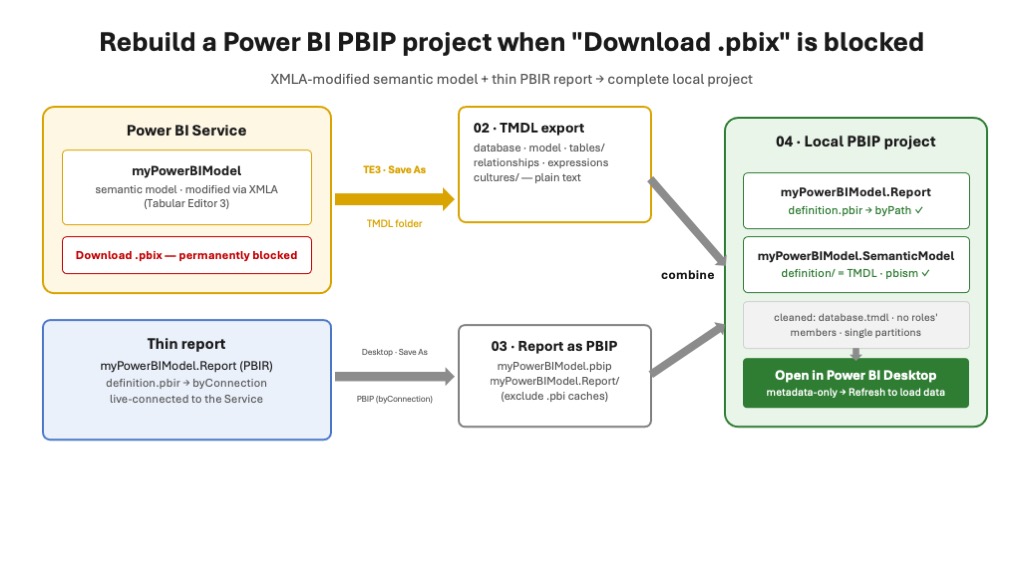
🔧 Technical: Export the model with TE3 (File → Save As, folder-format TMDL). Save the thin report as PBIP. Place the TMDL export in myPowerBIModel.SemanticModel/definition/, switch the report’s definition.pbir from byConnection to byPath — { “datasetReference”: { “byPath”: { “path”: “../myPowerBIModel.SemanticModel” } } } — the two are mutually exclusive.
What it takes — standard tools only
- Power BI Desktop — Microsoft’s free desktop application.
- Tabular Editor — the standard professional tool; your consultant almost certainly already uses it.
- The files themselves — modern Power BI projects are plain text. Nothing proprietary, no add-on licenses, no AI services, no migration project.
🔧 Technical: Desktop needs the PBIP/PBIR/TMDL preview options on. TE3’s TMDL serializer matches Desktop’s, so round-trip diffs stay minimal. The free Tabular Editor 2 can also export TMDL.
How to rebuild Power BI pbix — four steps
- Export the model’s blueprint. The specialist connects to the cloud model and saves its full definition — every table, calculation and business rule — as readable text files.
- Save the report separately. The dashboard is saved from Power BI Desktop as a project file; at this point it still points at the cloud.
- Put the two parts together and repoint. The model blueprint and the report are placed side by side in one project folder; one line is changed so the report looks at the local model, and a few cloud-only properties are removed from the model files.
- Open and refresh. The project opens in Power BI Desktop and loads your data fresh from the source. Save as .pbix if a single file is preferred. Done — a complete, local, editable copy.
🔧 Technical — files changed in step 3:
- myPowerBIModel.Report/definition.pbir — replace the entire byConnection block (the cloud connection string) with byPath; the two are mutually exclusive: { “datasetReference”: { “byPath”: { “path”: “../myPowerBIModel.SemanticModel” } } }
- myPowerBIModel.SemanticModel/definition.pbism — new file next to the definition/ folder: { “version”: “4.2”, “settings”: { “qnaEnabled”: false } } with the semanticModel schema reference.
- myPowerBIModel.SemanticModel/definition/database.tmdl — reduce to two lines, database + compatibilityLevel; drop the database name, id (service catalog GUID), compatibilityMode, language.
- definition/tables/*.tmdl — if incremental refresh was used, collapse PolicyRangePartitions to one import partition per table (Tabular Editor’s documented C# script automates this).
- definition/roles/*.tmdl — strip cloud role members; keep the roles and table permissions.
- Not copied at all: .pbi/ cache folders — Desktop regenerates them.
- Verify before opening: grep zero hits for byConnection, powerbi://, semanticmodelid; one partition per table; all JSON files parse. compatibilityLevel 1702+ implies DAX user-defined functions — enable the matching Desktop preview feature first.
Two decisions to make afterwards
- Who is master? Publishing the rebuilt project creates a new model in the cloud unless it deliberately replaces the original. Replacing re-enables downloads but discards the cloud model’s history — agree with your specialist which side is the source of truth going forward.
- Keep a copy. As part of good governance, ask your BI partner to keep the solution in Power BI’s project format and hand you a copy. It’s your business logic.
🔧 Technical: Overwrite-publish resets the artifact to Desktop-managed (new refresh history, download re-enabled, XMLA-only state gone). If the Service model stays master, keep deploying via TE3/XMLA and treat the local PBIP as a DR snapshot — or adopt Fabric Git integration and make this rebuild unnecessary next time.
Conclusion
Knowing how to rebuild Power BI pbix saves you when the original file is gone. ‘Download disabled’ is a technical side effect of professional model management — not a loss of ownership. Because Power BI’s project formats are plain text, a report and a cloud-managed model can always be reunited into a project, and a .pbix, that you control. If you rely on a Power BI solution and don’t have a local copy, it’s a fair and easy thing to ask for — and now you know exactly what your specialist needs to do.
Further reading
- Creating a PBIX file from the XMLA endpoint — Tabular Editor’s official how-to
- TMDL in Tabular Editor · Save to folder
- Tools in Power BI — SQLBI · Power BI is a model-based tool — SQLBI
Om oneBC365
oneBC365 leverer “Ledelsesinformation med fokus på Vækst “— bygget direkte på Microsoft Dynamics 365 Business Central data med præsentation i Power BI. Dashboard → Analyse → Detaljer giver ledelsen svar på hvad?, hvorfor? og hvilke? samme dag.
Læs mere på onebc365.dk.
Læs også: Power BI til Business Central — arkitektur, semantisk model og performance i praksis.